
X7 Prop & Poses Stairway set1
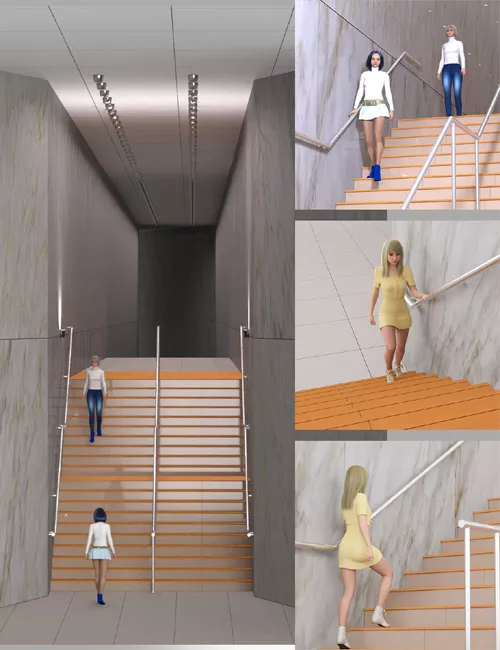
X7 Prop & Poses Stairway set1 is a detailed stairway environment and pose collection for DAZ Studio, featuring scene props, lighting, cameras, walking poses, and HDRI support for cinematic indoor renders.
Because characters vary in height and the length of each body part, after applying the poses included with this product to your character, you may need to adjust the positional relationship, especially the amount of movement on the Y axis. You may also need to correct the arm pose in relation to the handrails.
Included in this Package (DAz Studio version only):
1 Stairway set1 scene(file:0 stairway 1 set.duf) Includes all props, lights and cameras in the scene.
1 cameras file (These are the same as those loaded in the scene file "0 stairway 1 set.duf")
11 Pose files (for Genesis 8 Female, Genesis 8.1 Female) 4 positional poses and 7 walking poses.
The four positional poses do not affect the pose of the figures, but only changes their positions on the stairs.
11 Pose files (for Genesis 9) 4 positional poses and 7 walking poses.
The four positional poses do not affect the pose of the figures, but only changes their positions on the stairs.
14 prop files for loading props individually into scenes.
1 RenderSetting file for loading 1 HDRI file included with the product.
9 Textures (Includes 1 HDRI file and 4 marble texture files)
Usage
All poses have been adjusted to fit the default shapes of the Genesis 8 Female Base Figure, Genesis 8.1 Female Base Figure, and Genesis 9 Base Figure.
If your figure has a different shape, you will need to manually adjust the figure's position and body part settings.
First, load file:0 stairway 1 set.duf.
All props, lights, and cameras will be loaded into the scene.
If necessary, load a render settings file (RenderSetting.duf). This will load an HDRI file into the background.
Next, load your figure and apply the pose provided with the product.
For cameras 4, 5, and 6, it's often a good idea to turn off the headlamps. If the images from the cameras are too bright, turn off the headlamps in the camera parameters.
If the second floor scene feels dark overall, there are two ways to solve this. One is to add more DAZ Studio lights.
The other is to adjust the brightness of the light units in the scene. There is only one light in the scene, away from the stairs, that is the source of all the light units.
Find the Light Unit in the scene.
Look at the surface properties of the Light Unit and adjust the Light - Luminance item. The default is set to 30000.0. Try raising this to around 60000.0.
SUPPORT LINK
https://www.renderosity.com/marketplace/products/170176/x7-prop-poses-stairway-set1DOWNLOAD
https://nfile.cc/***/170176-RO.rar.htmlYou must login to show full link. No account? Create Account