
Placeholder Manager


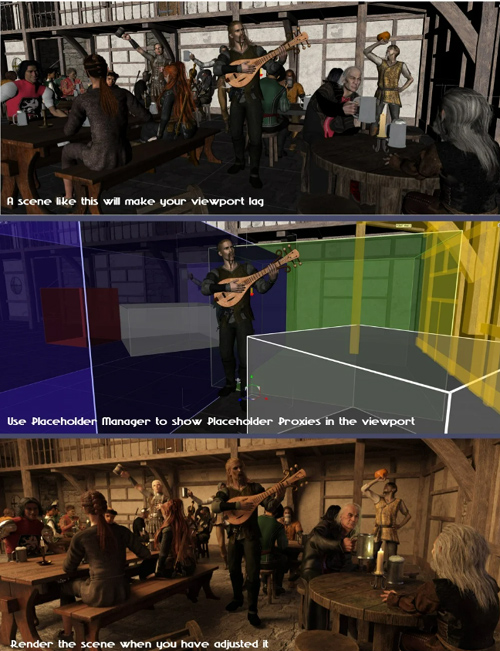
Do you create large and content-rich scenes? Have you ever had that feeling that the viewport has become slow and sluggish when you navigate it or try to adjust the current figure?
With Placeholder Manager you can easily turn grouped items into a placeholder box, so you see the space it is taking without having it shown in the viewport, making the viewport react and behave much more snappy. Just select the group node containing the items to group and run the PHM Make Placeholders script.
You can, at any time, remove the Placeholder proxy and make the group and its content visible in the viewport again by selecting the Placeholder proxy and running the PHM Remove Placeholders script.
While a group is turned into a placeholder, the group and the placeholder are locked so they cannot accidentally be moved.
When you render the scene or show the Iray Preview, the real items are visible and all the Placeholders are invisible, so what you see is what you get.
There is also another script, PHM Placeholder Manager, that you can use to see what is in all your placeholders, and also set the colors of the lines and sides of the placeholder boxes.
Also included, are two bonus scripts: Lock or Unlock all bones in a figure. These scripts come very handy when you are moving older figures in crowded scenes, as sometimes the figure gets weirdly wiggly and loses its pose when moved around.
SUPPORT LINK
https://www.daz3d.com/placeholder-managerDOWNLOAD
https://nfile.cc/***/87626-DAZ.rar.htmlYou must login to show full link. No account? Create Account