
Sub-Z: CORE PACK

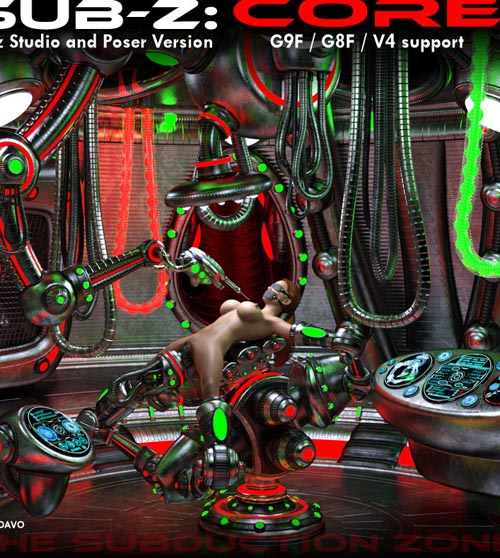
Ultra Sci-fi human or alien driven tech? You decide. Sub-Z Core features a futuristic experimentation room, restraints and tools with high tech or alien arc textures.
-
SPECIAL NOTE 1: Posing for Genesis 8/9 figures is based on the STANDARD, NON-MORPHED OR ALTERED figures. If you have applied morphs or altered body shapes or proportions, you must manually adjust the character and device positions if connection points are not touching. If you do have to alter the poses, you can do this to one side of the device and one side of your character then use the symmetry command to mirror the result to the other side.
Genesis 9 figure should have the female body shape morph applied before posing.
-
SPECIAL NOTE 2: Iray is the render engine of choice. This package only includes materials that will look good in Iray. Poser uses Firefly render engine and materials.
-
Daz Studio System Requirements:
- PC and Mac compatible
- Requires Daz Studio 4+ (created using Daz Studio 4.2)
- Poser version is available with material/surface zone adjustments and poses for V4
- - All files in .duf, .ds*, .png and .jpg format.
Poser System Requirements:
- PC and Mac compatible
- Should be backwards compatible to poser 8+
- All files in .obj, .cr2, .png and .jpg format.
- Poses included for V4.2
Instructions for installation is included in product readme as well as easypose tutorial.
-
Note: Descriptions below are for Daz Studio.
Poser version has same content but different folder structures and method of parenting.
Package Features:
CHAMBER FOLDER CONTENTS--
- Read First: These informational icons have instructions for the items in the library, please click on and read them for some directions.
- Cable 1: This is a set of thick, hanging cables. This is a figure with repositionable cables for adjustment. Place this figure anywhere in your scene for added interest.
Material Pose files are included for 3 different texture themes (Material poses in Material Theme or options folder)
- Cable 2: This is a single cable with transparent outter shell and lighted, bulbous interior filament that glows. Place this figure anywhere in your scene for added interest.
Material Pose files are included for 3 different texture themes (Material poses in Material Theme or options folder)
- Chamber: This chamber can either serve as a human high tech or alien experimentation chamber for dubios types of observation or experimentation. The chamber has 2 sets of walls, *wall1* walls are smooth walled and have no opening, by default these walls are not shown, they sit just below the chamber room, out of view. The *wall2* walls have an egg-shaped pod that can be used for displaying various speciments of creatures or people. There are 6 of each wall, 2 left, 2 right, front and back. You can move the walls out of view for better viewing angles.
There is a central lamp in the ceiling that can be moved in and out of view in the event you want to add the Hub figure. There are also right and left side columns with small lights build into them, these columns can be moved out of view or rotated around the center of the chamber.
PLEASE NOTE: Because of the non-typical shape of the room, some viewing angles might be obstructed, especially trying to view the recessed floor. The "base" body part of the chamber has some MORPHS that will drop the right, left, front or back sides of the base floor, floor light ring and recessed floor simultaneously. Select the "base" body part of the Chamber to access these morphs.
Lighting on the Chamber is emmissive lit, so it will glow in a dimly lit scene.
Material Pose files are included for 3 different texture themes (Material poses in Material Theme or options folder)
- Chamber Tunnel: This is an add-on tunnel that fits in the openings on the outter wall of the chamber. The tunnel curves so you can't see the end of the tunnel. This is a simple add-on item to add interest to your scene. You can hide the sides, ceiling or floor of the tunnel in the event you want to render a scene with something in the tunnel.
There are 2 pre-parented sets of chamber and tunnel combos in the assemblies folder for convenience.
Material Pose files are included for 3 different texture themes (Material poses in Material Theme or options folder)
- Chamber Vent Fan: This is a large fan unit you can import into the scene, it sits on the edge of the chamber. The 'body' portion of the fan vent rotates around the center of the chamber, select the 'body' part if you want to rotate it. This unit is simply for added interest if you want to use it. You might have to move some of the columns out of the way to use the fan.
Material Pose files are included for 3 different texture themes (Material poses in Material Theme or options folder)
- Control Panels 1 and 2: These are hovering control panels you can add to the scene for added interest. The screens are emmissive lit to glow in a dimly lit scene. Add and place as desired.
Material Pose files are included for 3 different texture themes (Material poses in Material Theme or options folder)
- Tank 1: This is a display or observation Tank that hangs from the center of the chamber ceiling. You may need to move the chambers central lamp out of the way in the event of collision. The tanks fluid level is morph adjustable. Pose files for G8F/G9F included in the pose library.
There is an add-on Base for the Tank if you don't want it in the center of the room, see below.
Material Pose files are included for 3 different texture themes (Material poses in Material Theme or options folder)
- Tank 1 Base: There is a stand alone tank base and a smart version. The smart version will automatically position and parent to the tank.
Material Pose files are included for 3 different texture themes (Material poses in Material Theme or options folder)
CHAMBER PRESETS SUBFOLDER--
There are 2 pre-assembled versions of the chamber:
- Chamber All Tunnels: This version has chamber tunnels attached to each wall section.
- Chamber Half Tunnels: This version has tunnels only on the front and back wall sections.
A material options subfolder is in this library for changing the texture themes on both the chamber and the tunnels, select the chamber then apply the theme.
SUPPORT LINK
https://www.renderotica.com/store/sku/71323_Sub-Z-CORE-PACKDOWNLOAD
https://nfile.cc/***/renderotica-71323.rar.htmlYou must login to show full link. No account? Create Account