
IK Control Rig for Genesis 8



A revolution in posing and animation for Genesis 8 in DAZ Studio.
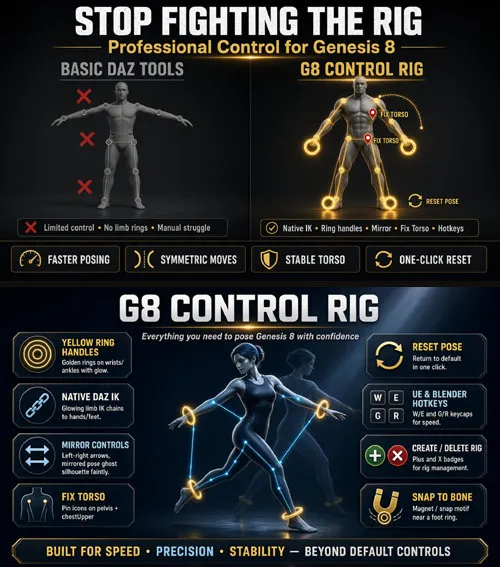
Yellow ring controls, native IK without the painful default workflow,
Mirror posing, Fix Torso, Reset Pose, and UE/Blender hotkeys — all in one plugin.
G8 Control Rig — a revolution in animation and posing in DAZ Studio
Forget fighting awkward native IK mechanics. G8 Control Rig brings Genesis 8
a modern control-rig experience: clear viewport rings, instant feedback, and
a clean pipeline — the feel of a serious DCC tool, right inside DAZ.
No more guessing how chains will behave, hand-tuning bones for every tweak,
or wasting time on confusing setups. Create the rig, move the controls,
and the figure responds.
WHY IT CHANGES YOUR WORKFLOW
• Native IK — without the struggle
The plugin uses real DAZ IK under the hood, but you work with clean visual
handles instead of hunting hidden nodes and obscure parameters.
• Yellow rings on hands and feet
Controls are obvious in the viewport: grab, drag, pose.
Translation and rotation of the limbs feel natural and predictable.
• Mirror Controls
Move the left hand or foot — the right side mirrors the motion.
Perfect for symmetric poses and fast character blocking.
• Fix Torso
Pins on pelvis and chestUpper keep the torso stable while you animate
the limbs. On by default — turn it off with one click when you need freedom.
• Reset Pose
One click returns the character to the default pose and snaps every
control back into place. No more drifting handles after experiments.
• Hotkeys like the big DCC apps
Unreal-style: W = Move, E = Rotate.
Blender-style: G = Translate, R = Rotate.
Switch the style that matches how you already work.
• Create / Delete in seconds
Entries in the Create menu plus Content Library scripts:
create the rig and open the pane / delete the rig and close the pane.
SIMPLE TO USE
1. Select Genesis 8.
2. Create Control Rig (or run the script).
3. Drag the yellow rings — your pose is ready.
The plugin pane stays focused: create, delete, reset pose,
Mirror / Fix Torso / hotkey checkboxes, and per-chain IK toggles.
Even if you avoided IK in DAZ before — this workflow is intuitive.
WHO IT’S FOR
• Genesis 8 animators and posers
• Content creators who need production speed
• Anyone tired of “out of the boxlimits who wants
predictable control over arms and legs
COMPATIBILITY
• DAZ Studio 4.12+ (Windows x64)
• Genesis 8 Female / Genesis 8 Male
WHAT’S INCLUDED
• g8controlrig.dll plugin + button icons
• Create / Delete scripts with preview icons
• Detailed README with install steps
G8 Control Rig is not “just another node in the scene.It is a new standard of comfort for Genesis 8 posing and animation in DAZ Studio:
more powerful than basic defaults, clearer than native IK alone,
and dramatically faster in daily work.
SUPPORT LINK
https://www.renderhub.com/intenzo/ik-control-rig-for-genesis-8DOWNLOAD
https://nfile.cc/***/ik-control-rig-for-genesis-8.rar.htmlYou must login to show full link. No account? Create Account