
IK Control Rig V2.1 Update



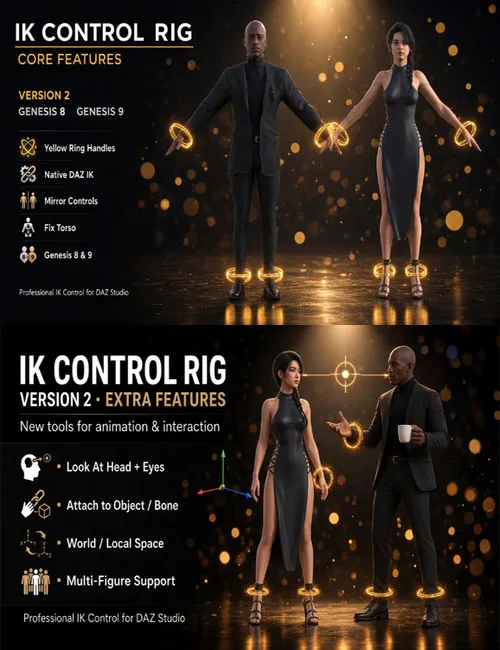
IK Control Rig brings professional Inverse Kinematics control to Genesis 8 and Genesis 9 in DAZ Studio. Pose characters with clear yellow ring handles in the viewport — no fighting bone axes, no manual joint wrestling.
Version 2 keeps the solid native DAZ IK foundation and adds animation-ready tools: Look At, Attach, World/Local space, and multi-figure workflows.
What's included
- Native DAZ Studio plugin (controlrig.dll)
- Content Library scripts: Create / Delete Control Rig
- Pane: Control Rig (Window > Panes)
Core features
- Yellow Ring Handles — pose hands and feet with viewport controls
- Native DAZ IK — drives real DAZ IK chains under the hood
- Genesis 8 & Genesis 9 — one workflow for both generations
- Mirror Controls — pose one side, the other follows
- Fix Torso — keep pelvis/chest stable while posing limbs
- Reset Pose — restore default pose and snap controls back
- UE / Blender hotkeys — optional W/E or G/R for Translate / Rotate
New in Version 2
- Look At (Head) — head and neck track a target
- Look At Eyes — eyes track independently or together with the head
- Attach Control — attach a control to another control, bone, or object (and keep the offset)
- Space: World / Local — switch Universal Tool axes for move and rotate
- Multi-Figure Support — build and use rigs on multiple figures in one scene
New in Version 2.1
- Blender Grab and Rotate — G moves the selected control and R rotates it, the same way as in Blender.
- DAZ Studio 6 render fix — control rings no longer show up in renders.
- Reset Control — reset the position and rotation of one selected control.
Why artists use it
- Faster, cleaner limb posing
- Familiar ring-handle workflow
- Native IK stability (no brittle custom solvers)
- Built for real animation tasks: eye contact, props, interaction, multi-character scenes
Requirements
- DAZ Studio 4.12+ or DAZ Studio 6 (64-bit, Windows)
- Genesis 8 and/or Genesis 9 in the scene
Quick start
1. Install the plugin into DAZStudio4\plugins\
2. Copy Content scripts into your My Library
3. Load Genesis 8 or 9, select the figure
4. Run IK_CreateControlRig (or Create > Create Control Rig)
5. Open Window > Panes > Control Rig and start posing
Full install steps are in the included README.txt.
Short store blurb
Pose Genesis 8 & 9 with professional yellow IK ring handles. Native DAZ IK plus Look At, Attach, World/Local Space, Mirror, Fix Torso, and multi-figure support. Version 2.1 adds Blender G (Grab) and R (Rotate), a DAZ Studio 6 render-visibility fix, and Reset Control for a single control.
SUPPORT LINK
https://www.renderhub.com/intenzo/ik-control-rig-v2DOWNLOAD
https://nfile.cc/***/ik-control-rig-v2_1_0.rar.htmlYou must login to show full link. No account? Create Account