
Photo2Expression
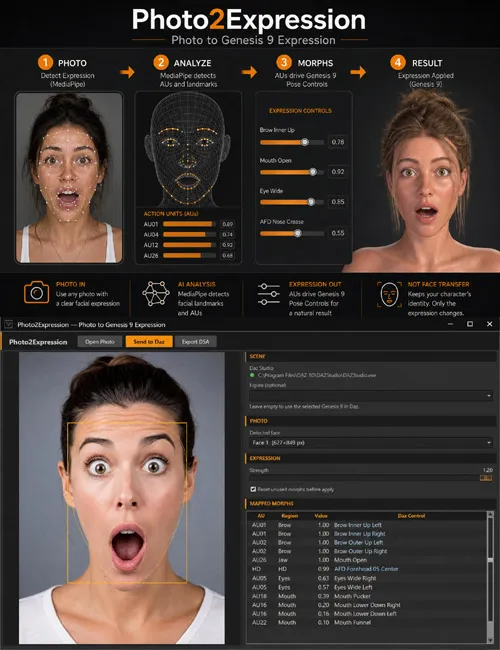
Turn a photo of a face into a Genesis 9 expression. Photo2Expression reads the smile, brows, eyes, and jaw on the picture and drives Pose Controls on your existing figure. Identity stays the same — this is not Face Transfer. Windows companion app for Daz Studio.
Got a reference photo with the exact face you want — a real smile, asneer, surprise, disgust — and a Genesis 9 that still looks bored?
Photo2Expression measures the expression on the photo and applies it to the figure you already have in the scene.
This is not Face Transfer. Face Transfer copies face shape and likeness. Photo2Expression copies expression only: brows, lids, mouth, jaw, and optional HD wrinkles. Your character stays your character.
This is not a Daz Studio plugin. There is no pane under Window. It is a small Windows app: open a photo, click Send to Daz, and a script runs in the Studio you already have open. Undo in Daz is named
Features
• Reads a still photo (front or 3/4) and maps it to Genesis 9 Pose
Controls > Head
• Left / right smile, frown, squint, wide eyes, brow up / down, jaw
open, sneer, and related mouth / cheek / chin controls
• Optional HD wrinkle drive when Aging Face Details HD (AFD) or Aging
Morphs (AM9) is installed on the figure
• Strength slider so you can underplay or push the result
• Reset unused head morphs before apply, so the previous expression
does not linger
• Send to Daz writes a .dsa and opens it in the running Studio
• Export DSA if you prefer File → Scripting → Execute Script…
• No Python, no webcam, no DazScriptServer
What's Included
• Photo2Expression Windows installer (64-bit)
• Desktop / Start Menu shortcut
• ReadMe with required and optional morph names
Required
• Windows 10 or 11, 64-bit
• Daz Studio 4.21+ or Daz Studio 6
• Genesis 9 in the scene, with Pose Controls > Head
(included with base Genesis 9 / Starter Essentials)
A commercial FACS product is not required. The app matches names such
as Mouth Smile Left, not only AU labels.
Recommended (for visible skin folds)
Pose Controls move the mesh. Wrinkles are separate morphs.
• Aging Face Details HD for Genesis 9 (AFD) — preferred names
AFD Brow Center 01, AFD Forehead 05 Center, AFD Eye Wrinkles Side,
AFD Mouth Corner Folds, AFD Nose Crease, AFD Eye Wrinkles Lower
• or Aging Morphs for Genesis 9 (AM9)
AM Eyebrow Centre Folds HD, AM Forehead Wrinkles HD,
AM Eye Side Wrinkles HD, AM Nasolabial Folds / AM Laugh Lines 1 HD,
AM Nose Wrinkles HD, AM Under Eye Wrinkles HD
One pack is enough. Turn on SubD / HD in the viewport or wrinkles
stay almost invisible.
How to Use
1. Open Daz Studio and load Genesis 9. Select the figure body
(not eyelashes, brows, or tears).
2. Start Photo2Expression.
3. Open Photo — face large in frame, mouth visible, not a full profile.
4. Adjust Strength if needed.
5. Click Send to Daz.
Notes
• Transfers expression, not identity and not skin texture from the photo
• Photos only — no live webcam, no video
• Works best with a fairly frontal portrait and light on the face
• Select the Genesis 9 body in the Scene tab before sending
• If a second Studio window opens, close it and run the saved script
from File → Scripting → Execute Script…
SUPPORT LINK
https://www.renderhub.com/intenzo/photo2expressionDOWNLOAD
https://nfile.cc/***/photo2expression.rar.htmlYou must login to show full link. No account? Create Account