
BounceWiggle Plugin

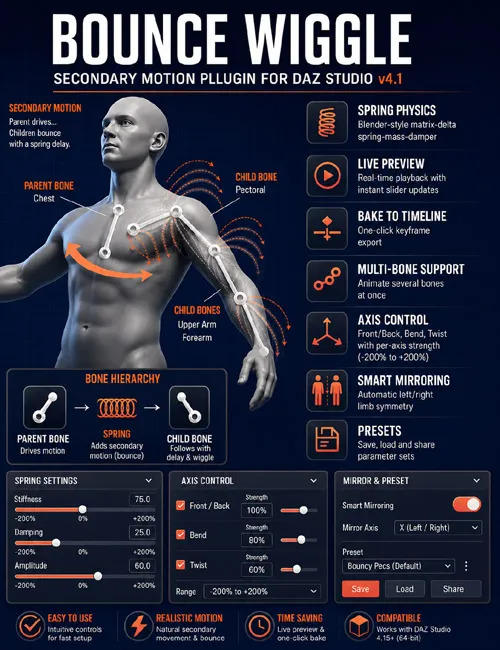
Bounce Wiggle — a secondary animation script for Daz Studio. It adds realistic bounce, wobble, and inertia to child bones based on parent bone motion — without hand-keying hundreds of frames.
Bounce Wiggle automatically creates secondary motion for selected skeleton bones. The script analyzes how the parent bone moves in your animation and uses spring-mass-damper physics to calculate a natural, lagging response on the child bone — similar to Blender’s bounce/wiggle, but directly inside Daz Studio.
Ideal for breasts, belly, hair, clothing, accessories, tails, ears, and any bones that should slightly trail and oscillate behind the character’s main movement.
Realistic Spring Physics:
Matrix-delta spring-mass-damper physics (inspired by Blender Wiggle Bones)
Parent bone motion is passed to the child bone via the matrix delta between frames
Natural oscillation, damping, and inertia without jitter or artifacts
Live Preview — Real-Time Feedback:
Plays back the animation within the Play Range with live simulation
Sliders update the result on the fly — during playback and while paused
Preview does not clutter the timeline: temporary keys are rolled back via undo
Bake to Timeline — One-Click Keyframing:
One button simulates the full Play Range and writes keys to XRotate / YRotate / ZRotate
Writes over the existing animation without deleting base keys
Clean output: simulation always builds from the original animation, with no “wiggle on wigglestacking
Multi-Bone Support:
Select multiple bones at once (Ctrl+click)
Preview and Bake process all selected bones in a single pass
Each bone gets its own axis map and independent spring state
Precise Axis Control (Axis Influence):
Three semantic axes: Front/Back, Bend, Twist
Automatic mapping to Daz X/Y/Z channels based on bone parameter labels
Enable/disable each axis individually
Influence strength: −200% to +200% (direction inversion supported)
Smart Left/Right Mirroring:
For left-side limb bones, Axis Influence parameters are automatically inverted
Symmetrical behavior on left and right with the same settings
Exception for Pectoral L/R bones — no inversion is applied
Preset System:
Save, load, and delete parameter sets
Folder: Documents/BounceWiggle/Presets/
Presets store: Stiffness, Damping, Amplitude, and all axis settings
SUPPORT LINK
https://www.renderhub.com/intenzo/bouncewiggle-pluginDOWNLOAD
https://nfile.cc/***/bouncewiggle-plugin.rar.htmlYou must login to show full link. No account? Create Account