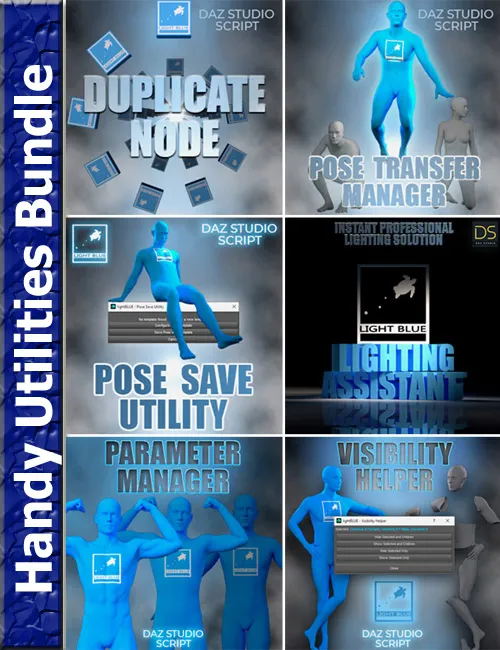
Speed up your workflow with these helpful Daz Studio scripts!
This bundle includes:
Duplicate Node - DazStudio Tool is a simple and convenient tool for DazStudio that allows you to duplicate nodes in your scene.
Run the script, select a node in the scene, select the number of copies, and duplicate that node together with all its child nodes.
The copies will have the same materials, pose, and shape presets, as well as all the other properties of the original node.
To make it more functional and interesting, this script gives you some settings and options for the duplication process.
You can choose the rotation of the copies, it can be incremental or not, and by any axis.
There are also three pattern options to choose from. The linear pattern is the default, it allows you to offset the copies by any axis
so they don't overlap with the original or with each other. Besides the linear pattern, there are circle and grid patterns.
The circle pattern has options for the circle radius that will be formed from the created copies, as well as the option to position the circle
on one of the three planes (XY, XZ, or YZ plane). The grid pattern will give you the options to choose the number of rows and columns
in the grid, and also the distance between the rows and the distance between the columns. This pattern also has the plane options for positioning
the grid that will be created by your copies. Each of the patterns is affected by the number of copies you choose and the rotation options.
The best way to test the pattern options is with the DazStudio primitives or some other simple objects.
The script will suggest a base name for the copies, followed by an index suffix (_1, _2 …), but you can also give your copies a custom name (indexing will be applied).
Any node in the scene can be copied (props, figures, cameras, lights…), but keep in mind that the duplication of complex figures with many child nodes will be slower
than the duplication of simple objects.
This script will open a non-modal window, which means that you can work in your scene while it is open and close it whenever you want.
This tool is designed for all DazStudio users, it's very simple and easy to use, even if you don't have too much experience!
Pose Transfer Manager is a simple and convenient DazStudio tool for pose transferring with additional options.
It allows you to transfer a pose from a Genesis 8 figure to Genesis 9 figure, from Genesis 9 to Genesis 8,
and also from one Genesis 8 to another Genesis 8, and from one Genesis 9 to another Genesis 9.
Important functionality of this tool is the partial pose transfer. You can choose the bones from which you want to transfer the pose.
Additionally, you can also choose whether you want to transfer the pose of these bone's children bones or not.
This allows you to transfer just the pose of an arm, or both arms, or the upper body, or lower body, or combine two or more poses in whichever way you like.
The Pose Transfer Manager allows you to select a percentage of the pose you want to transfer.
This means that the current pose of the target will interpolate to a chosen percentage of the source's pose.
Using this functionality, you can easily find the in-between poses, from one pose to another, for the chosen body parts or the whole body.
The Pose Transfer Manager creates a fun way to transfer and combine the poses of Genesis 8/8.1 and Genesis 9 figures.
This script will open a non-modal window, which means that you can work in your scene while it is open and close it whenever you want.
This tool is designed for all DazStudio users, it's very simple and easy to use, even if you don't have too much experience!
"Pose Save Utility" is a very simple and useful DazStudio tool for pose creators.
The tool allows you to create a pose preset saving template, and then use the template
to save the next pose with the same pose saving settings without the need to open the hierarchy
and check and uncheck the boxes again. When you create your template, you can save the next pose with two clicks,
no need to go through the pose saving settings again. Just select the figure, run the script, and click save.
The tool will remember the directory where you saved your last pose preset and offer that location first,
you just need to choose a name for your pose preset, and you are good to go.
Since different figures have different structures and names, you will still have to create a new template for a different figure.
This tool is very simple, its purpose is to speed up the process of saving the pose presets for pose creators
who create a large number of poses and save them with the same pose saving settings.
It is designed for all DazStudio users, it's very easy to use, even if you don't have too much experience!
"Lighting Assistant" is a tool that creates professional lighting setups for your renders in DazStudio.
It offers 10 cinematic lighting presets for you to choose from.
Simply choose the lighting preset, and all lights will be created and positioned considering the chosen figure/prop/bone and camera position.
Lighting presets will create one or more different types of lights and adjust environment options as needed to complete the mood.
This is a fast and easy way to get the professional lighting setups in your renders with just a few clicks.
"Lighting Assistant" will remove the already existing lighting from the scene if you wish, and it can also parent the lights to the prop/figure.
It is designed for all DazStudio users, it's very easy to use, even if you don't have too much experience!
The lighting presets include: Rembrandt, Butterfly, Loop, Film Noir, Soft Studio, Golden Hour, Horror, Romantic, Action Hero, and Product Shot.
"Parameter Manager" is a tool for DazStudio, primarily designed for easier finding and resetting of morphs on one or more selected figures.
This tool can also reset other modifier/pose, modifier/shape, and material type parameters.
When you select the type of parameters that you want to reset, you can narrow down the parameters list by their group (Actor, General, Pose Controls)
and/or node label (Head, Arm, Hand), and for material parameters you can use the surface names.
When you select the groups, you can search for specific names in those groups (Michael, Vernon, Bodybuilder, Glossy, Color, Bend, Twist…).
Both selected groups and selected parameters will be shown in the preview lists, so you know exactly what will be affected.
The searches can be done by keywords. You can include or exclude groups/parameters with certain keywords. Matching all keywords is optional.
Even though the Parameter Manager's main purpose is to reset to default values, it also allows setting the chosen parameters' values.
If you select one or more parameters that use the same type of value (int, float, enum, bool, or color), you can apply the chosen value to all at once.
This tool is created mainly for professionals who build characters from many different morphs, but it can also be used by beginners.
The step-by-step guide on how to use the tool is included in the README.tex and INSTRUCTIONS.pdf, and there is also a quick guide included
in the product files, which you can click on and open in the Daz Studio app.
"Visibility Helper" is a simple solution for node visibility manipulation in DazStudio.
The script offers four options: "Hide Selected and Children", "Show Selected and Children", "Hide Selected Only", and "Show Selected Only".
It can be used on any figure, and it allows you to select multiple figures at the same time.
The script opens a simple non-modal dialog so that you can select the figures while the script window is open.
The purpose of this tool is to speed up the workflow. We all hate it when we want to switch off the visibility of a figure, and then we have to also click the
"eye" icon on every child node (eyes, eyebrows, mouth, eyelashes, clothes, or any other child nodes) separately.
With the Visibility Helper, you can do that with one click, and you can be sure that all the child nodes are switched off and nothing is left hanging in the air.
Simply select one or more figures in the scene, click the option that you want, and it's done.
It is designed for all DazStudio users, it's very easy to use, even if you don't have too much experience!
This product comes with an additional script that you can run once, and it will add the "Visibility Helper" to your "Main" toolbar so you don't have to add it manually.
Having this tool in the toolbar will allow easy and fast access whenever you need it.
You must login to show full link. No account?