
Ashen Bloom for Genesis 9
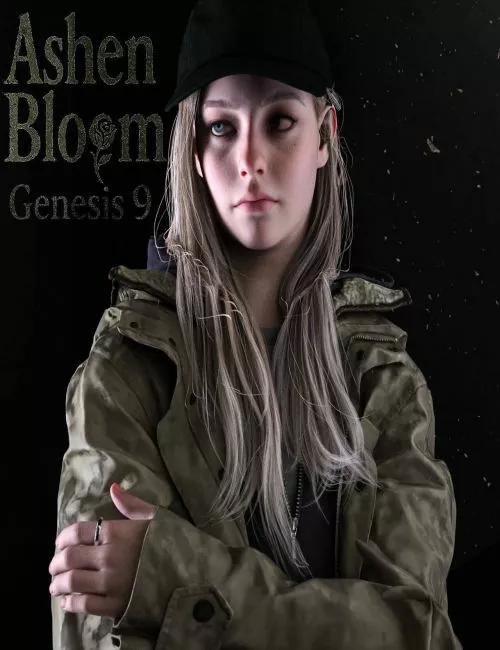
"Ashen Bloom" for Genesis 9 - Inspired Character
Unleash a captivating presence with "Ashen Bloom," a custom Genesis 9 character designed with a unique teenager morph inspired. This full custom morph brings a distinct and compelling aura to your Daz Studio renders, perfect for survival, mystery, or contemporary scenes. "Ashen Bloom" is ready to explore dark secrets or face any challenge with her determined spirit.
Key Features:
Custom Character Preset (Full Morph Only): A comprehensive character preset for Genesis 9, featuring a unique full custom morph. This is a unified morph; she comes as a complete figure without separable head or body parts.
Custom Teenager Morph: "Ashen Bloom" includes a specialized morph that gives her the appearance of a teenager, adding to her unique character.
Dynamic Clothing & Hair (dForce): Her casual yet determined outfit includes a jacket, jeans, and styled hair.
Ashen Bloom Jacket (dForce): The "Ashen Bloom Jacket" utilizes dForce for realistic fabric drape and dynamic movement.
Ashen Bloom Jeans (dForce): The "Ashen Bloom Jeans" also utilize dForce for realistic cloth simulation.
Ashen Bloom Hair (dForce): Her hair is designed with dForce for realistic flow and movement.
Important Note on dForce: While dForce is used for the jacket, jeans, and hair, caution is advised during simulation. Due to their close proximity to the body and other elements, careful adjustments may be necessary to prevent undesirable results.
Ashen Bloom Sneakers: Conforming sneakers.
Movable Prop Accessory:
Ashen Bloom Cap (Prop): The cap is included as a separate prop, allowing for full flexibility in positioning and rotation to suit your scene.
Fixed Finger Ring:
Ashen Bloom Ring: A ring is included and attached directly to her finger. If you wish to detach or reposition it, navigate to Daz Studio's Edit menu > Figure > Convert Figure To Prop.
Complete Facial Details: "Ashen Bloom" comes with eyebrows and eyelashes, all with their respective material presets, completing her determined look.
Important Notes:
dForce Usage: It is strongly recommended to use dForce simulation for the jacket, jeans, and hair. Please be mindful of potential interactions during simulation and be prepared for manual adjustments.
Ring Modification: The ring is parented to the finger. Use "Convert Figure To Prop" if detachment or independent manipulation is desired.
Only the items explicitly listed and shown in the file hierarchy are included in this purchase.
Included Files & Directory Structure for Manual Installation:
To manually install "Ashen Bloom," extract the contents of the .zip archive directly into your Daz Studio content directory. The files are organized as follows:
Your Daz Studio Content Directory (e.g., C:\Users\Public\Documents\My Daz 3D Library or your custom path)
└── People
└── Genesis 9
└── Characters
└── KuraiKya
└── Ashen Bloom
├── Character Preset
│ ├── Character Preset.duf
│ ├── Character Preset.duf.png
│ ├── Material Preset.duf
│ ├── Material Preset.duf.png
│ ├── Shaping Preset.duf
│ └── Shaping Preset.duf.png
├── Clothing
│ ├── !!!Load All Ashen Bloom Outfit!!!.duf
│ ├── !!!Load All Ashen Bloom Outfit!!!.duf.png
│ ├── Ashen Bloom Jacket.duf
│ ├── Ashen Bloom Jacket.duf.png
│ ├── Ashen Bloom Jeans.duf
│ ├── Ashen Bloom Jeans.duf.png
│ ├── Ashen Bloom Ring.duf
│ ├── Ashen Bloom Ring.duf.png
│ ├── Ashen Bloom Sneakers.duf
│ └── Ashen Bloom Sneakers.duf.png
├── Hair
│ ├── Ashen Bloom Eyebrows.duf
│ ├── Ashen Bloom Eyebrows.duf.png
│ ├── Ashen Bloom Eyelashes.duf
│ ├── Ashen Bloom Eyelashes.duf.png
│ ├── Ashen Bloom Hair.duf
│ └── Ashen Bloom Hair.duf.png
├── Props
│ ├── Ashen Bloom Cap.duf
│ └── Ashen Bloom Cap.duf.png
├── Ashen Bloom with Clothes.duf
├── Ashen Bloom with Clothes.duf.png
├── Ashen Bloom without Clothes.duf
└── Ashen Bloom without Clothes.duf.png
Detail: https://www.renderhub.com/kuraikya/ashen-bloom
DOWNLOAD HERE:
DOWNLOAD
https://nfile.cc/***/.rar.htmlYou must login to show full link. No account? Create Account