
HardwareMonitor
by BBlK | on 13-Oct-23 | 0 comments |
Related Articles

Big Office (+1000 Elements) - Unreal Engine 4
Big Office (+1000 Elements) - Unreal Engine 4 Big Office...

Unrealengine-Mega-colection-vol.42
Include: Automatic Landscape Material Basic Faction System...
Unrealengine-Mega-colection-vol.43
Include: BLE Utilities V2 Blockout Tools Plugin Bike...

Low Poly Shooter Pack v4.0
Documentation & Guides Quick Start Guide Documentation...

Infinity Tiles
Additional Features and Template For details please see...
Documentation, Old reviews and questions, [email protected]
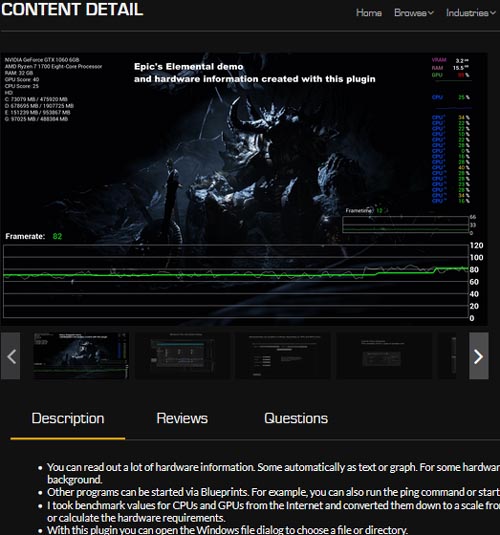
You can read out a lot of hardware information. Some automatically as text or graph. For some hardware information like CPU/GPU utilization, Powershell is run in the background.
Other programs can be started via Blueprints. For example, you can also run the ping command or start all possible .exe files.
I took benchmark values for CPUs and GPUs from the Internet and converted them down to a scale from 0 to 100. Based on this score, you can automatically set graphics settings or calculate the hardware requirements.
With this plugin you can open the Windows file dialog to choose a file or directory.
There are various file functions.
SUPPORT LINK
https://www.unrealengine.com/marketplace/en-US/product/hardwaremonitorDOWNLOAD
https://nfile.cc/***/unrealengine-hardwaremonitor_5.1.rar.htmlYou must login to show full link. No account? Create Account
Dead link?. Comment bellow to request new link.
Category: Other Vendors |
Note: Now support Premium only because I have no more time to update for free users
Related Articles
Big Office (+1000 Elements) - Unreal Engine 4
Big Office (+1000 Elements) - Unreal Engine 4 Big Office...
Unrealengine-Mega-colection-vol.42
Include: Automatic Landscape Material Basic Faction System...
Unrealengine-Mega-colection-vol.43
Include: BLE Utilities V2 Blockout Tools Plugin Bike...
Low Poly Shooter Pack v4.0
Documentation & Guides Quick Start Guide Documentation...
Infinity Tiles
Additional Features and Template For details please see...
Information
Users of Guests are not allowed to comment this publication.