
Autodesk 3ds max plugins
by cod2war | on 15-May-21 | 0 comments |
Related Articles

PolySnow+ v1.01 and PolyCloth v2.02 for 3ds max 2016-2022
PolySnow+ v1.01 and PolyCloth v2.02 for 3ds max 2016-2022...
Autodesk MotionBuilder 2023 Win x64
Autodesk MotionBuilder 2023 Win x64...
![[Max] Dirtizer 2 3D Max Script](http://i.imgur.com/F15Qqj9.jpg)
[Max] Dirtizer 2 3D Max Script
Dirtizer 2 3D Max Script max | Plugins | 372 MB...
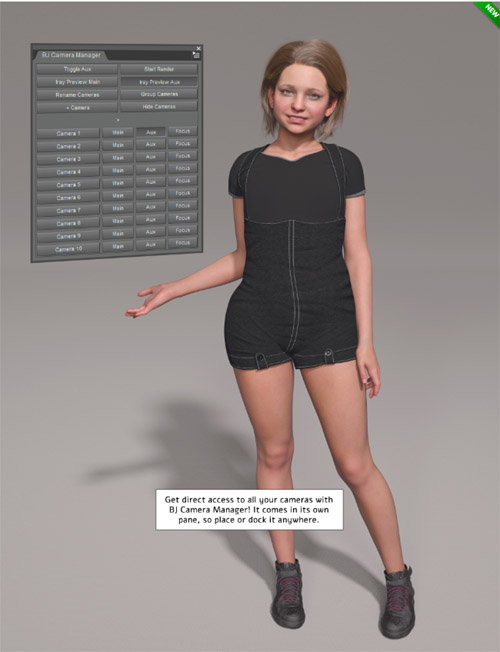
BJ Camera Manager Plugin
BJ Camera Manager Plugin Detail link: BJ Camera Manager is...

A&G Tools Bundle for 3ds max 2014 - 2015 Win64
A&G Tools Bundle for 3ds max 2014 – 2015 Win64 max |...

Autodesk 3ds max plugins
==========
Info:
>>>>>>>>>>>>>>>>>>>>>>>>>>>>>>>>>>>>>>>>>>>>>>>>>>>>>>>>>>>>>>>>>>>>>>>>>>>>>>>>>>>>>>>>>>>>>>>>>>>>>>>>
MXTools Form Cutter 2.1
Version Requirement: 3ds Max 2017-2021
аbout:
It is used to cut inward or outward in objects along a freehand path that you draw with the tool and provides various ways to do so.
FormCutter covers a range of uses, from quick ideation to final output, to developing interactive projects and playing with your ideas, including a few options to help you to improve the aesthetics of your designs.
>>>>>>>>>>>>>>>>>>>>>>>>>>>>>>>>>>>>>>>>>>>>>>>>>>>>>>>>>>>>>>>>>>>>>>>>>>>>>>>>>>>>>>>>>>>>>>>>>>>>>>>>>>>
Crea3D – Camera Studio v1.0
Camera Studio allows you to animate cameras much faster!
You can create an orbit or spiral motion around selected objects with just 1 click and easily manipulate it. There is a number of other motion presets. Add shake to selected cameras when you need.
The motion path function allows you to create a seamless motion between several reference cameras.
>>>>>>>>>>>>>>>>>>>>>>>>>>>>>>>>>>>>>>>>>>>>>>>>>>>>>>>>>>>>>>>>>>>>>>>>>>>>>>>>>>>>>>>>>>>>>>>>>>>>>>>>>>>>>
MXTools Decal Placer 1.0
Version Requirement: 3ds Max 2017-2021
аbout:
DecalPlacer is a plugin for Autodesk 3ds Max utilizing on placing decals on objects, which can help you to speed up your work.
How to Install:
In the Main Menu, go to Scripting > Run Script…, select *.mzp file and click Open.
Or just drag and drop the *.mzp file into the 3DS Max viewport;
Click Install on Installer Dialog.
After �Install Successfully’ you can assign a keyboard shortcut. Found the tool in:
Customize > Customize User Interface > Category > MxTools > DecalPlacer
>>>>>>>>>>>>>>>>>>>>>>>>>>>>>>>>>>>>>>>>>>>>>>>>>>>>>>>>>>>>>>>>>>>>>>>>>>>>>>>>>>>>>>>>>>>>>>>>>>>>>>>>>>>>>>>>>
MXTools Light Placer 1.1
Version Requirement: 3ds Max 2017-2021
аbout:
LightPlacer is a plugin for Autodesk 3ds Max utilizing on placing lights, which can help you to speed up your work.
Necessary Plugins:
You will need to have at least one version of one of the rendering engines installed!
Supports the following 3rd Party Renderers: Vray, Corona, Arnold, Octane.
How to Install:
In the Main Menu, go to Scripting > Run Script…, select *.mzp file and click Open.
Or just drag and drop the *.mzp file into the 3DS Max viewport;
Click Install on Installer Dialog.
After �Install Successfully’ you can assign a keyboard shortcut. Found the tool in:
Customize > Customize User Interface > Category > MxTools > LightPlacer
DOWNLOAD
https://nfile.cc/***/.rar.htmlYou must login to show full link. No account? Create Account
If link broken, comment under article. Click here to Read the rule before request
Category: Other 3D |
Related Articles
PolySnow+ v1.01 and PolyCloth v2.02 for 3ds max 2016-2022
PolySnow+ v1.01 and PolyCloth v2.02 for 3ds max 2016-2022...
Autodesk MotionBuilder 2023 Win x64
Autodesk MotionBuilder 2023 Win x64...
[Max] Dirtizer 2 3D Max Script
Dirtizer 2 3D Max Script max | Plugins | 372 MB...
BJ Camera Manager Plugin
BJ Camera Manager Plugin Detail link: BJ Camera Manager is...
A&G Tools Bundle for 3ds max 2014 - 2015 Win64
A&G Tools Bundle for 3ds max 2014 – 2015 Win64 max |...
Information
Users of Guests are not allowed to comment this publication.