
DA Glowing Eyes



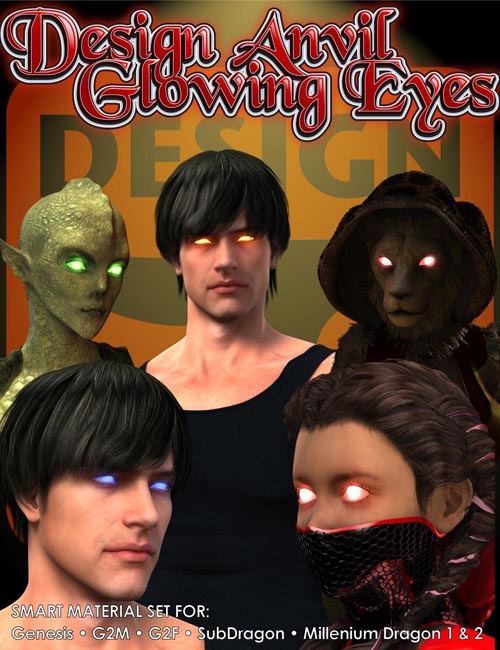
Real glowing eye effects applied directly in DAZ Studio!
This set contains Glowing Eye material presets for DAZ Studio 4.6+. 28 Smart material presets that will work on a variety of figures (9 Iris,10 Medium Full Eye, 9 XL Full Eye).
Also included are 5 Utility material presets for hiding lashes or equalizing SS skin surface settings.
Figures supported Includes: Genesis Figures, Genesis 2 Female Figures, Genesis 2 Male Figures, Millennium Dragon 1 & 2 and the Millennium SubDragon/ SubDragon LE (High Resolution geometry setting only for Sub Dragon figures).
•The Material Preset types•
IrisIris material presets will only effect the Iris surfaces of the selected figure. Add +ActivateScleraGlow to add intensity and spread the glow. Mix and match with the Full eye Material presets.
Medium Material PresetsA Full eye material preset of medium strength. Mix and match with Iris material Presets.
XL Material Presets: A Full eye material preset of high strength. Mix and match with Iris material Presets.
•5 Utility material presets•
Activate Sclera is used in combination with the Iris Presets. Activating it will turn on the SS settings for the Sclera on the selected figure allowing the glow to emanate from the Irises through to the rest of the eye.
EyelashOFF will hide the eyelash of the figure by changing the opacity setting to 0%
SSEqualiser For skin using non SS type material presets. Occasionally you may notice slight color changes between SS activated surfaces and non-activated surfaces. In most cases it will not be obvious but for close renders apply this preset to the figure to equalize the surfaces SS settings
Skin Bump Corrector Some shader types may lose some of there bump setting after SSEqualiser has been applied. Use this setting to apply new bump +/- setting of .03
Skin Bump Corrector x2 Some shader types may lose some of there bump setting after SSEqualiser has been applied. Use this preset to apply new bump +/- settings of .06 to all skin surfaces.
SUPPORT LINK
https://daz3d.com/catalog/product/view/id/17667DOWNLOAD
https://nfile.cc/***/17667.rar.htmlYou must login to show full link. No account? Create Account